
Course Selection for 2026-27 Update
2026 - 2027 Course Selection
It is that time of the school year to start thinking about course requests for the 2026 - 2027 School Year. Students in advisory on January 7th were provided an overview of the course selection process and graduation requirements.
School Counselors will be visiting English classes to assist students with making course requests in the PowerSchool Portal on the below dates:
February 6th - 9th Grade
February 9th - 10th Grade
February 10th - 11th Grade
The ‘Course Request’ screen on students’ grading portal for the 2026 - 2027 school year will open on February 6th and remain open until February 13th. During the Month of January, teachers will discuss course recommendations for the next school year. When the “Course Request’ screen on students’ grading portal opens on February 6th, you will see teacher recommendations.
Students are strongly encouraged to meet with their school counselor to discuss appropriate courses and graduation requirements.
Program of Studies
This document outlines all the courses offered at Newington High School and provides information about graduation requirements, credits and grading. This document will be helpful in understanding the course selection process and in helping students choose elective courses. The 2026 - 2027 Program of Studies is available on the Newington High School website (click here).
The January 7th Course Selection & College Credit Night presentations can be found here.
This event highlighted the programs offered at NHS and reviewed information about graduation requirements, grading and course levels.
If you have any questions, please contact your student’s school counselor.
PowerSchool Portal Feature- Graduation Plan Progress
Students and parents/guardians can now see on their PowerSchool Student and Parent website account credits that students have completed and need to complete for graduation (this feature does not work in the mobile app). To find the “Graduation Plan Progress Screen '' on the grading portal users should click on the “Grade History" tab on the left hand side of the screen. Then on the top right of the screen click the blue button “View Graduation Plan Progress.” The screen will look similar to the picture below (based on student credit status):
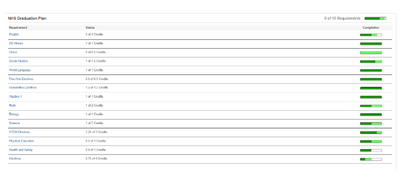
Each requirement has a “status” column that shows how many credits a student has completed to date and a “completion” column that shows a visual of student progress towards that requirement:
Dark green- credits completed, based on courses students have passed and completed. When a requirement has a completion bar that is shaded completely dark green students have completed that requirement.
Light green- credits in progress, based on courses students are enrolled in for the current school year.
White- student still need to complete these requirements in future years.
Yellow- student requested course(s) in this graduation requirement that have not been completed yet This status will show up when students begin to request courses for next year.
Please note the Graduation Planner for students that transferred to Newington High School may not be accurate.
Students and parents/guardians should contact their school counselor with any questions regarding the graduation planner or requirements. Graduation requirements can also be found in the NHS Program of Studies (linked here).